Showing posts with label Transaction code. Show all posts
Sample ABAP Program
Getting Hands Dirty : ABAP-EDITOR
I
would like to remind a few things,
- The one we would be interacting is ‘PRESENTATION LAYER’;
- Your server is the ‘APPLICATION LAYER’ and finally
- The ‘DATABASE’.
And
in SAP-ABAP, SQL commands can be used; we can have NATIVE SQL or OPEN SQL. But
will go with OPEN SQL.
------------------------------------------------------------------------------------------------------------

The
one you are seeing above is the screen when you log-in to SAP from your desktop
or PC
<the screen above is the presentation layer>
On
top of the window are the menus, below the menu there is a text box with a
green tick, here is where we should enter the ‘TRANSACTION CODE’.
Here
are some are some commonly used transaction code.
TRANSACTION CODE
|
DESCRIPTION
|
SE80
|
OBJECT
NAVIGATOR
|
SE38
|
ABAP
EDITOR
|
SE37
|
ABAP
FUNCTION MODULES
|
SE24
|
CLASS
BUILDER
|
SE11
|
ABAP
DICTIONARY
|
SE51
|
SCREEN
PAINTER
|
SMARTFORMS
|
SAP
SMART FORMS
|
So,
first let’s have a sample report program.
Go
to Transaction -> SE80 -> REPOSITRY BROWSER -> <in the drop down choose> PROGRAM -> <below the drop down enter the program name> ZSAMPLE and press ENTER.

screen 1.1
A
popup will appear as above conforming to create a program, click YES.
Un Check the TOP INCL <if you check it will include a ‘TOP INCLUDE in your program>
and 'enter'.

screen 1.2

screen 1.3
It will ask for package, for now save it as local object.
It will ask for package, for now save it as local object.
Finally your program editor will be opened.
Now, we are going to write a program to do all
the arithmetic operations.
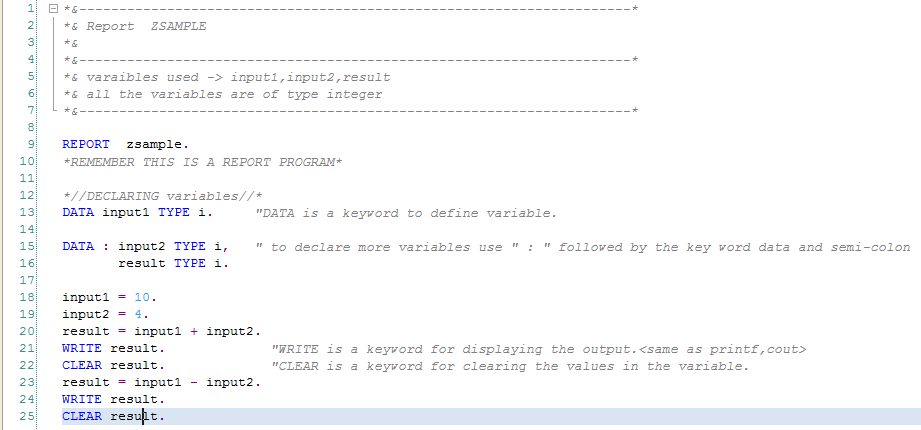
I have given all the definitions on the program itself as comments.
Comments can be given by following ‘*’ or ' “ ' symbol.
The first part is to define variables;
We are having three variables in our program, input1, input2 and result.
All of the variables are integer format.
To define a variable in SAP you have to write a keyword “DATA”.
If you have multiple variables to be defined use the keyword “DATA” followed by “:“ and at the end of the type use ‘,’ (comma) instead of ‘.’ (Full stop) and when final variable
is declared use “.”.
And now the arithmetic operations take place,
the result is stored in the variable result.To display the result,we should use
a keyword “WRITE” similar to cout and printf in c and c++..CLEAR keyword clears
the memory of the variable next to it, so after that the variable will not be
holding any values.
Remember,
|
SAP ABAP - A Brief Introduction to Reports and Module Pool Programming
Getting Started: SAP-ABAP
Just a few steps ahead before we get our hands
dirty. It’s necessary to know the concept and other technical related things in
ABAP.
ABAP stands for Advanced Business Application Programming.
It’s a programming language
similar to COBAL and the programs we do will not be stored as a separate
external file like JAVA/C++ programs. All ABAP programs reside inside the SAP database.
As
in other programming languages, an ABAP program is either an executable unit or
a library, which provides reusable code to other programs and is not
independently executable.
ABAP
distinguishes two types of executable programs:
·
Reports ( Can be
executed directly )
·
Module pools (
They can be executed only via a ‘TRANSACTION CODE’ )
REPORTS:
Example:
You have created
a report program which gives the employee id of all the employees in your
company filtered by some parameter (take department code as parameter).so
when you execute the program it will ask for department code and gives the
result.
Here is the
example of the output, how it would look like.
 |
MODULE POOL:
Module pools are used to get data from the user and
store in the SAP database as well as to display them
from the database. They contain user defined screens designed using screen
painter. (Remember whenever we create screens in module pool program we have to
name them in numbers, and so we should not name our screens as ‘1000’ because
its SAP’s standard screen is ‘1000’, which it uses in report
programming and selection screens. Each screen has its own flow logic, which is
divided into a "PBO" (Process before Output) and "PAI"
(Process after Input) section. The term “dynpro” (dynamic program) refers to
the combination of the screen and its flow logic.
After all your
programming you can’t directly execute a module pool program, you have to
create a ‘TRANSACTION CODE’.
What is a transaction code?
Transaction
code is a short cut key attached to a screen. It should have only numbers and
characters (ztcode or zt42).for example if you create a transaction code for
your program, and enter the transaction code the program will be executed and
the corresponding screen will be called.
To
make it clear and easier lets have an example,
Example:
<don’t worry about the programming
logic, just try to understand this example, we shall see the programming
logic later>
You have created
a program that first requires a validation (i.e. you have to enter your
user_name and password) and then you will be redirected to your screen where
you will have all the details of you salary, expense and all.
(to make get the
point)
So, here we have
to create two screens,
Assume Screen no.
2000 for validating the user_name and password.
Screen no. 2001
for details of salary, expense.
Now create a
transaction code, eg; zuser01
Now, when you
enter the transaction code this the magic that happens, J
|
|

So, from this you
will have clear that PBO Executes before the screen and PAI loads after
receiving an input from the user.
So we will have a
command like this in PAI.
**********************************************
PAI of screen
2000.
When ‘SUBMIT’ <when submit button
is clicked>
Call screen 2001. <the next screen is called>
**********************************************
The next PBO of
screen 2001 loads and the screen will be displayed
<remember this
is just for you to understand module pool program and the events (PAI &
PBO) in them, and programming concepts will be explained later>
|
|
OK, now come back
to the point so far we have seen executable programs in SAP ABAP. Now we shall
have a little explanation for non-executable programs.
Include modules: An INCLUDE module
gets included at generation time into the calling unit; it is often used to
subdivide very large programs.
Example:
INCLUDE zemployee.
<here zemployee is the include, when the compiler comes here, it
executes all the commands inside zemployee>
|
Subroutine pools: Subroutine pools contain blocks of code enclosed by FORM /ENDFORM
statements and invoked with PERFORM.
Example:
PERFORM zemployee.
When the compiler comes into the above line, the commands or programs
inside the subroutine zemployee will be executed <i.e. the commands within
FORM and ENDFORM of the subroutine name, here ‘zemployee’>
FORM zemployee
ENDFORM
|
Function groups: Function groups are libraries of
self-contained function modules enclosed
by FUNCTION / END FUNCTION and invoked with CALL FUNCTION.
Object classes and
Interfaces: Object
classes and interfaces are similar to Java classes and interfaces; the first
define a set of methods and attributes, the second contain
"empty" method definitions, for which any class implementing the interface
must provide explicit code.
Type pools: Type pools define collections of data
types and constants.
<for the last three, giving
examples will make you confuse, when we get our hands dirty we shall have a
clear look on those types>